How to Set Up a Minecraft Server for Kids
Written for a parent who has been asked for a server, has not run one before, and would like it to be the sort of thing that does not generate a support request every evening.
The order below matters. Two of these steps are much harder to do after children have already been playing.
Step 1: Work out which editions they play
Do this first, because it decides everything else.
Minecraft comes in two editions that cannot normally share a world. Java Edition runs on Windows, macOS and Linux. Bedrock Edition runs on Xbox, PlayStation, Switch, phones, tablets and the Microsoft Store version for Windows.
Ask each child which device they play on and write it down. If they are all on computers, a plain Java server is the simplest thing that works. If any of them are on a console or a tablet, you need a server set up for crossplay, and that is worth reading the crossplay guide before you start rather than after.
This is the decision that is expensive to change
Discovering after a fortnight of building that one child cannot join is the single most common way a family server goes wrong.
Step 2: Lock it before anybody connects
A server's address is discoverable, and the internet is scanned continuously by people looking for open Minecraft servers. An unlocked server that has been up for a weekend will find visitors.
Enforce the allowlist first, then add people:
/whitelist on
/whitelist add <name>
With the allowlist enforced, only accounts you have named can connect and everyone else is refused at the door. A brand new server with an enforced allowlist and nobody on it admits nobody at all, including you. That is the correct direction to fail in: a server nobody can join yet is a two minute fix, and a server anybody can join is a griefed world by the weekend.
Leave online mode alone
Some guides suggest turning online mode off so unlicensed clients can join. It also destroys your allowlist, because the server can no longer check that somebody claiming to be a name on your list actually owns that account. On a server for children this is the last setting you want to weaken.
Step 3: Collect the usernames properly
This step generates more confusion than the rest of the page combined, because the name a child tells you is often not the name the server needs.
- Java players are identified by their Minecraft profile name. A Microsoft account can carry an Xbox gamertag and a Java profile name that are completely different. Find the profile name in the launcher, or look it up at namemc.com.
- Bedrock players are identified by their Xbox gamertag, usually with a distinguishing prefix added by the server so it cannot collide with a Java name.
A child who plays on both a tablet and a computer is genuinely two accounts and needs two entries. Getting this wrong produces a child who is certain they were added and still cannot get in, which is an unwinnable conversation.
Step 4: Set the rules that prevent arguments
These are not safety settings. They are the settings that decide how many disputes you get asked to referee.
| Setting | Suggested for younger players | Why |
difficulty | easy, or peaceful for the youngest | Peaceful removes hostile mobs entirely |
pvp | false | Players cannot hurt each other |
keepInventory | true | Removes the single biggest source of tears |
mobGriefing | false | Creeper explosions stop destroying builds |
spawn-protection | leave on | Keeps the shared arrival area intact |
keepInventory is the one to change first. Losing a full inventory in lava, an hour before bedtime, is the classic ruined evening.
Step 5: Back it up somewhere else
A Minecraft world is a folder, and it is the only irreplaceable thing on the server. A child can spend months on a build.
Whatever else you do, the backup needs to live somewhere other than the machine running the server. A copy on the same drive protects you against a mistake and not against the drive failing.
Before any big change, version, settings, adding a pack, have an operator run /save-all so everything is flushed to disk first, then take the copy.
Step 6: Decide how it closes at night
An always on server is on at bedtime too. Options, in increasing order of effort, are covered in how to set a bedtime on a Minecraft server.
The short version: warn the players before it happens, close the world for everybody at once rather than singling out one child, and make sure it survives a restart. Being disconnected mid build with no warning is what makes a child experience bedtime as the server being broken.
Hosting it yourself, honestly
Running the server on a machine at home is free and it works. Three things to know before you commit:
Somebody has to leave a machine on. The world is only available while it is running, so the "we can only play when Dad is home" problem is not solved, only moved.
Letting friends in from other houses means forwarding a port. That points a route from the internet at a machine on your home network. It is done constantly and it is not reckless, but it is a decision worth making deliberately rather than by following a guide that does not mention it.
Your address changes. Most home connections do not keep the same address forever, so the address you gave your child's friends stops working at some point, usually on a weekend.
None of that argues against doing it. A spare laptop and twenty minutes is a genuinely good answer for a household where everybody is on the same network.
What we do instead
Our Minecraft server is $9/mo and arrives with the above already decided.
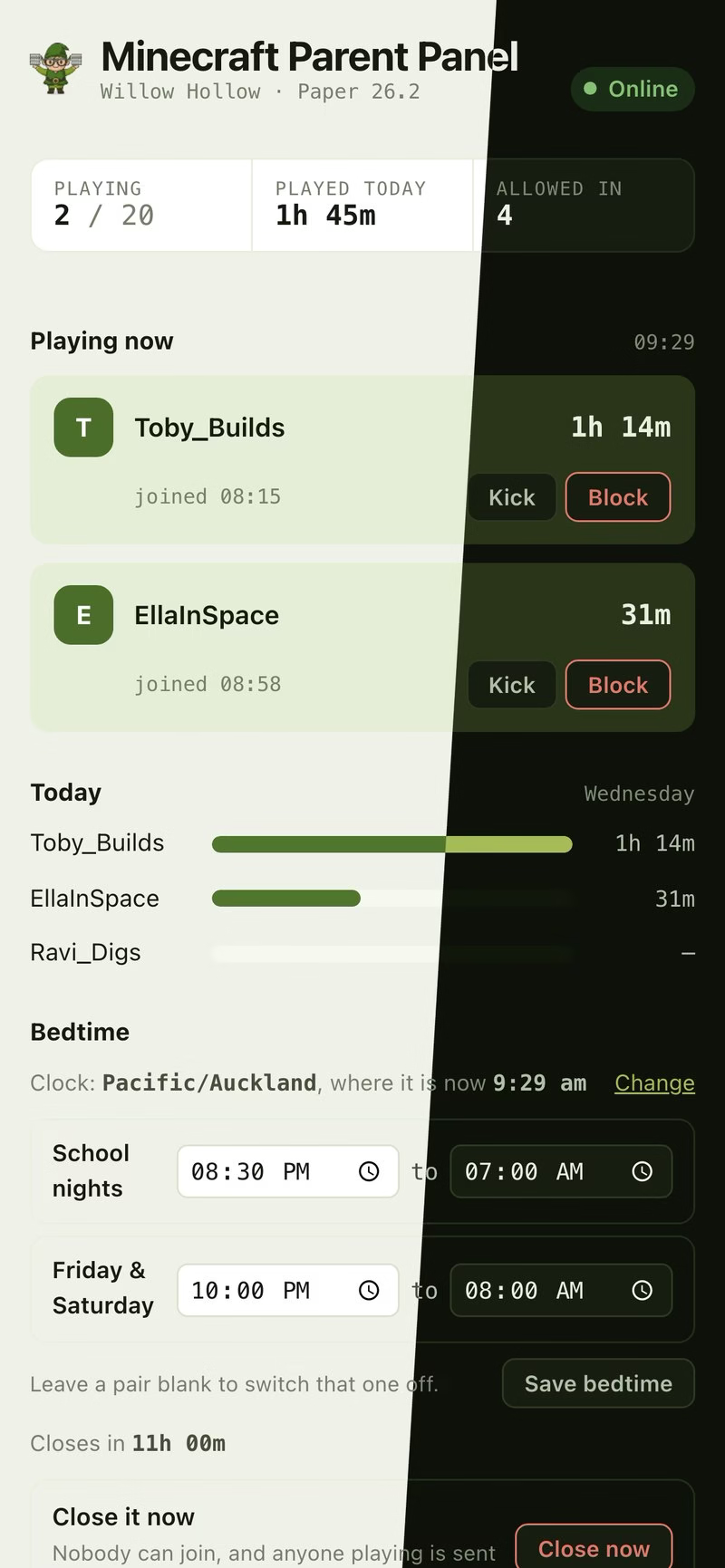
Built for a phone first, because "is she still on?" is a phone question. The players are made up; the panel is not.
- Locked from the first boot, so it never spends a weekend open while you work out the allowlist.
- Crossplay installed and configured, so console, phone, tablet and computer players share one world.
- A private panel showing who is playing and for how long, with the allowlist, an invite card that fills in the right address per device, and a bedtime with warnings.
- A fixed address that does not change, and nothing opened on your home network.
- Worlds on backed up storage, rather than on a drive in the spare room.
Start a trial of Minecraft for Families Terraria for Families
Frequently asked questions
How much does it cost to run a Minecraft server for a family?
At home, the electricity and a machine you already own. Hosted, ours is $9/mo. The variable that actually drives cost is memory, and a handful of children on a plain server needs very little of it. Large modpacks are the expensive case.
How many children can play on one server?
For an ordinary server with no mods, a household and their friends is comfortably within reach. The number people quote for trouble is a public community of dozens, which is a different product.
Do I need to buy Minecraft for each child?
Yes. Every player needs their own copy. We host the server, not the game.
Can I move an existing world onto a hosted server?
Yes. The world is a folder, and it can be uploaded to the storage the server reads from.
Should I read my child's chat?
That is your call rather than ours, and it is worth deciding on purpose. Server operators can, because chat is written to the server log. We do not, on our servers, and it is not a setting you can turn on. Presence and playtime let you run a household rule; a chat transcript is a different thing.
What is the single most important step?
Step 2. An enforced allowlist with four names in it does more than everything else on this page put together.