How to Set a Bedtime on a Minecraft Server
Minecraft has no scheduling of any kind. Nothing in the game or the server closes the world at nine o'clock, so every solution is something running alongside it.
This page covers how to build that yourself, the four things that make homemade versions fail, and what we do instead.
Why "just turn the computer off" stops working
It works right up until the server stops being in your house. Once the world is hosted somewhere so that a cousin can join on a Saturday morning, the off switch is not in the hallway any more. And once other households are playing on it, closing it becomes a thing you have to do on purpose rather than a thing that happens when you go to bed.
The other reason is more ordinary: being the person who says it is time to stop, every night, is wearing. A schedule that closed before anybody asked takes you out of that conversation.
What "closed" should mean
There are two workable definitions, and picking the wrong one causes most of the trouble.
Stop the server process. Total, simple, and it frees the machine. The costs are that a restart takes time in the morning, and anybody still playing is disconnected without ceremony, losing whatever was not saved.
Leave it running and refuse new connections. The server stays up, so it can warn people first, disconnect them politely, and tell anybody who tries later that the world is closed rather than appearing broken. In practice this means enforcing the allowlist with nobody on it.
The second is better for a family server, and it is what a well behaved bedtime looks like from a child's side: a warning, then a message that says the world is closed, rather than a connection that fails.
The trap in the second approach
Emptying the allowlist means saving the real one first and putting it back in the morning. A version that forgets to save it hands the household back an empty list, which reads as "the server deleted all my friends". Save first, restore after, and never issue a plain whitelist off, because on a family server the allowlist is the entire access control.
Doing it yourself
You need three things: a way to send commands to the running server, a scheduler, and somewhere to record the real allowlist while it is parked.
Sending commands
Minecraft servers speak RCON, a small remote console protocol. Enable it in server.properties:
enable-rcon=true
rcon.port=25575
rcon.password=something-long-and-random
Then send commands with any RCON client:
mcrcon -H localhost -P 25575 -p "$RCON_PASSWORD" "say The world closes in 10 minutes"
mcrcon -H localhost -P 25575 -p "$RCON_PASSWORD" "whitelist list"
Do not expose the RCON port
RCON authenticates with a single password and its traffic is not encrypted. Anything that can reach the port and guess the password owns the server. Bind it to localhost and keep it off the internet.
Scheduling it
A pair of cron entries covers the basic shape:
50 20 * * 0-4  /usr/local/bin/mc-warn 10
59 20 * * 0-4  /usr/local/bin/mc-warn 1
0  21 * * 0-4  /usr/local/bin/mc-close
0  7  * * *    /usr/local/bin/mc-open
That is Sunday to Thursday at nine, which is the school night half. Weekends want their own pair of lines with later hours.
The four things that break homemade versions
Timezones. The schedule runs on the server's clock, not yours. A server left on UTC while the family is in Auckland closes the world in the middle of the afternoon. Set the timezone explicitly and check it after the first night rather than assuming.
Windows that cross midnight. A window of 21:00 to 07:00 is not a simple "is now between these two times" comparison, and the naive version is wrong for exactly the hours you care about. Test the wrap case specifically. This is a real bug we shipped and caught: a Thursday 21:00 to 07:00 window read as active at 11:16 on Friday morning, which would have kept the world closed all day.
Restarts. If the server restarts overnight, whatever you did to close it is undone unless the closing state lives somewhere the restart cannot erase. Minecraft rewrites parts of its own configuration on startup. Keep your own record of whether the world should be closed, and re-apply it on a timer rather than setting it once and trusting it to stick.
Nobody is warned. Being disconnected without notice, mid build, is what makes a child experience bedtime as the server breaking. Two warnings, ten minutes and one minute, cost nothing and remove most of the complaint.
What we do instead
Our Minecraft and Terraria servers have bedtime built into the panel, included with the server.
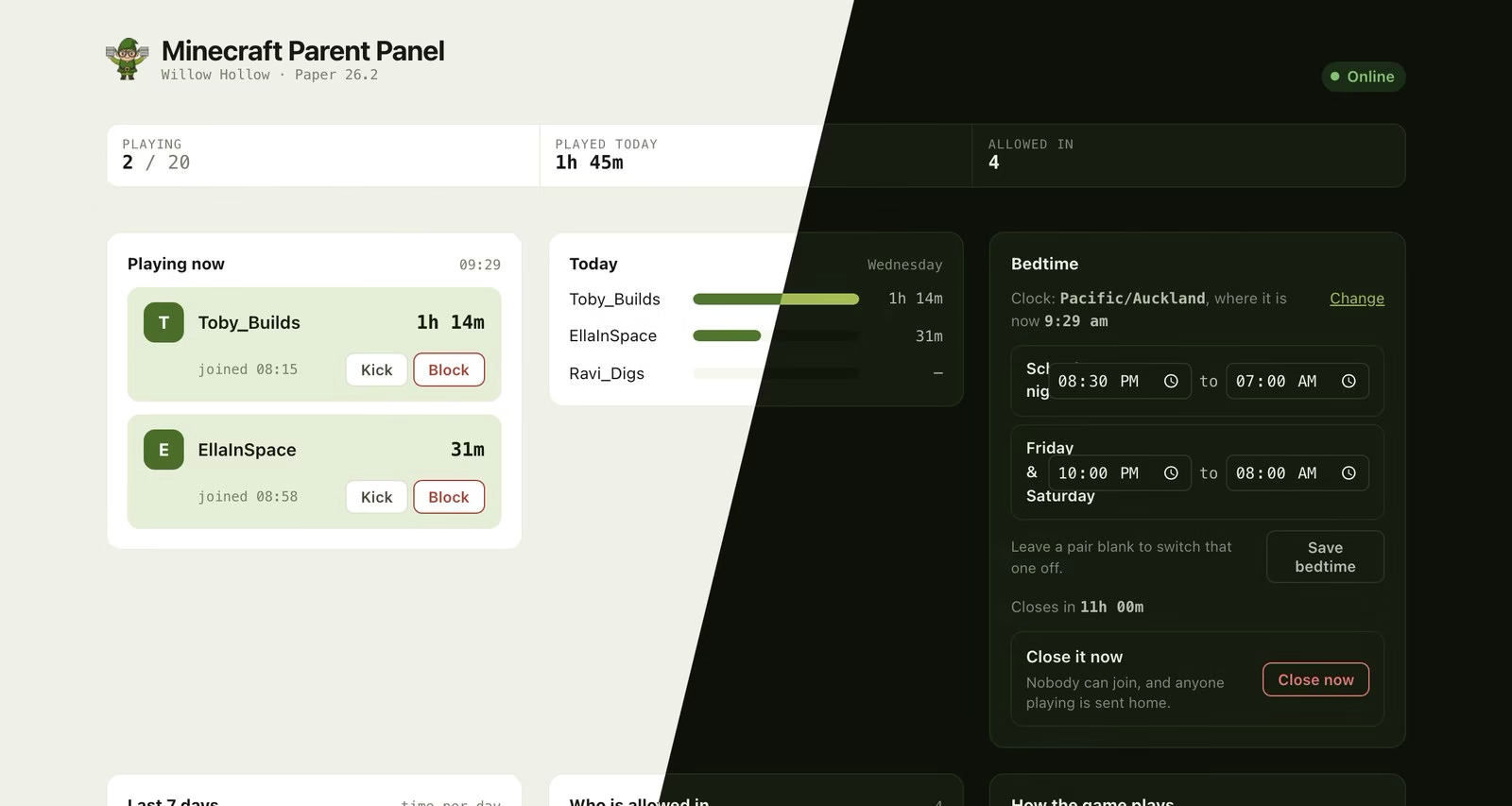
School nights and weekends set separately, the timezone stated next to the countdown, and a close it now button. The players are made up; the panel is not.
- Separate hours for school nights and weekends, set once.
- Warnings in the game ten minutes and one minute before, in wording you can change.
- The world closes for everybody at once, rather than singling out one child.
- A late pass that opens it for tonight without disabling tomorrow.
- A close it now button, for when asking twice has not worked.
- Your timezone, chosen in the panel, shown next to the countdown so a wrong one is visible rather than silent.
The state is recomputed continuously rather than set by a timer, so a restart in the middle of the night is corrected within a minute instead of quietly reopening the world at 3am.
Start a trial of Minecraft for Families Terraria for Families
Frequently asked questions
Does Minecraft have a built in bedtime or schedule?
No. There is no scheduling in the game or the server software. Every solution is an external scheduler sending commands, a plugin, or a feature of the hosting panel.
Will my child lose their build when the world closes?
No. The world is saved and the builds are exactly as they were when it reopens. What can be lost is a few seconds of very recent activity if the server is stopped abruptly, which is one reason to warn players and let the server save first.
Can I set different hours for weekends?
You should. A single schedule applied to every night is the version families abandon after a fortnight. School nights and weekends want their own hours.
Can my child just play on a different server at bedtime?
Yes. This closes your world, not the internet. What it does is take you out of the argument: the server is shut, and it was shut before anybody asked. Device level screen time controls are the tool for the broader question.
What happens if somebody tries to join while it is closed?
On a well built version they get a message saying the world is closed, rather than a connection failure. The difference matters, because a failure looks like something is broken and generates a question for you.