Minecraft Parental Controls
Parents usually arrive at this question with one of four worries: who can talk to my child, who can get into their world, how long have they been playing, and how do I get them off it at bedtime.
Minecraft answers the first two reasonably well and the second two not at all. This page is the honest map of which is which, and what people do about the gaps.
What Microsoft account settings actually cover
If your child plays on a child account inside a Microsoft family group, the family settings cover the parts that happen outside any one server:
- Whether they can play multiplayer at all, and whether they can join servers that are not run by Microsoft.
- Who can send them messages, and whether cross-network chat is allowed.
- Screen time on that device, as a daily allowance across apps.
- Spending, so an in-game purchase needs your approval.
That is a real set of controls and it is worth turning on. What it cannot do is tell you anything about a specific world. It does not know that the server your child plays on is the one you set up for them, and it does not distinguish half an hour of building with a cousin from half an hour in a menu.
The child has to be in a family group for any of it to apply
A child playing on an adult account, or on an account they made themselves with a date of birth that says they are 22, gets none of these settings. This is the most common reason a parent finds the controls "do not work".
What a Minecraft server gives you natively
Once you are running the server, a different and more useful set of controls applies. These are operator commands, typed in game by an account with operator rights, or through whatever console your host provides.
| Control | Command | What it does |
| Allowlist | /whitelist on, /whitelist add <name> | Only named accounts can connect |
| Remove access | /whitelist remove <name> | Takes effect immediately |
| Remove someone now | /kick <name> | Disconnects them, they can rejoin |
| Block someone | /ban <name> | Disconnects them and keeps them out |
| See who is on | /list | Names of connected players |
| Difficulty | /difficulty peaceful | Turns off hostile mobs entirely |
| Player versus player | pvp=false in server properties | Players cannot hurt each other |
| Keep items on death | /gamerule keepInventory true | Removes the worst source of tears |
| Stop creeper damage | /gamerule mobGriefing false | Explosions no longer wreck builds |
Two of these matter far more than the rest.
The allowlist is the whole of your access control. A server's address is discoverable, and the internet is scanned constantly by people looking for open Minecraft servers. An allowlist that is enforced turns "anybody who finds this can join" into "four named accounts can join".
Online mode makes the allowlist mean something. With online mode on, the server checks each player against Minecraft's authentication servers as they connect, so a name on your list is a specific verified account rather than a name somebody typed. Turning online mode off, which some guides suggest to let unlicensed clients join, quietly destroys this: anybody can then claim to be any name on your list.
What is missing, and why
Three things parents ask for repeatedly do not exist in Minecraft at any layer.
There is no playtime report. The server writes a log line when somebody joins and another when they leave. Nothing turns that into "Ellie played 40 minutes today and 3 hours this week". You can read the log yourself, and people do.
There is no schedule. Minecraft cannot close the world at nine o'clock. It has no concept of a calendar.
There are no notifications. Nothing tells you somebody joined unless you are in the game, or watching the log.
The reason for all three is the same: Minecraft's server was built for the person administering a community, who is assumed to be present and playing. The parent who pays for a family server and does not play is not a user Mojang designed for.
How people fill the gaps
Everything below is achievable on a server you run yourself. None of it is exotic, and it is worth knowing even if you never do it, because it tells you what a host is doing on your behalf.
Reading playtime from the log
The server log records joins and disconnects with timestamps. Pairing them gives you sessions per player. A short script that tails the log and appends to a file is enough, and the awkward part is not the parsing, it is that the log rotates and restarts reset your position, so a naive version quietly loses days.
Closing the world on a schedule
Two approaches, both common:
- Stop and start the server on a timer. Simple and total. The cost is that a restart takes time, and anybody mid action loses the last few minutes of unsaved progress.
- Enforce an empty allowlist at bedtime and restore it in the morning. The server stays up, so it can still warn people, and nobody new can get in. The trap is that a careless version wipes the real list and hands it back empty.
Either way, you want to warn players before it happens. Being disconnected without notice, mid boss fight or mid build, is what turns a bedtime rule into an argument.
Getting an alert when somebody joins
The same log lines that give you playtime give you alerts. Piping a match on the join line into a notification service is a few lines of shell.
What we do instead
Our Minecraft and Terraria servers ship with a private panel that does all three, and it is included rather than being a separate tier.
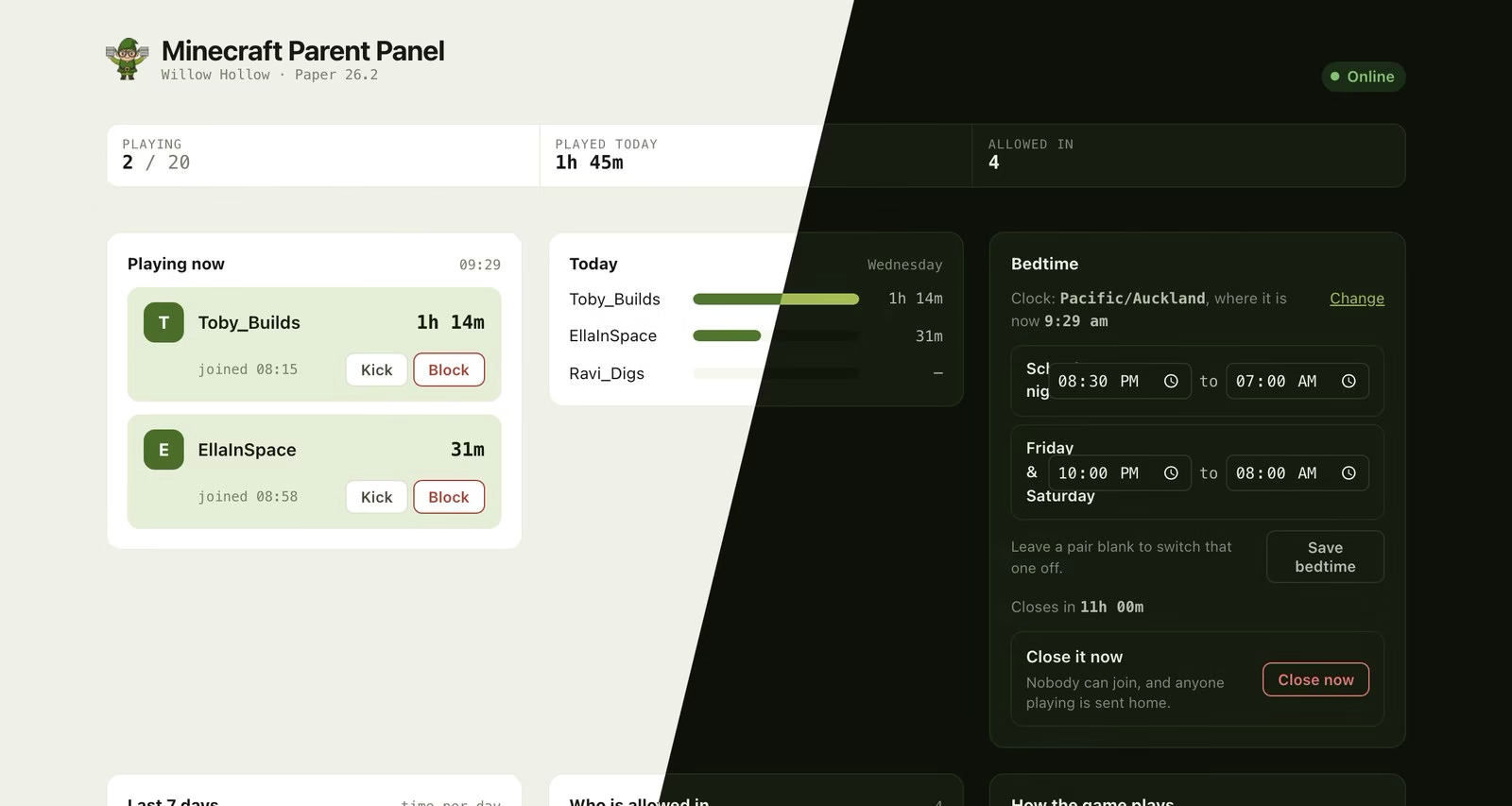
Playtime, the allowed list and bedtime on one screen. The players are made up; the panel is not.
- Who is playing right now, and how long each of them has been on this session.
- Playtime today and across the past week, per player.
- A bedtime with separate hours for school nights and weekends, warnings in the game ten minutes and one minute before, and a late pass for one night that does not disable tomorrow.
- The allowlist, as a list you edit, including anybody who was turned away so you can let them in with one tap.
- A notification on your phone when somebody joins or leaves.
The panel sits behind your ElfHosted login, at a different address from the one the kids use to play, so they cannot open it.
Two things it deliberately does not do. It does not read or store chat, so it cannot tell you what your child said or to whom. And it does not enforce a per child daily allowance, because cutting one player off mid session turns a household rule into an argument with a computer. Bedtime closes the world for everybody at once instead.
Start a trial of Minecraft for Families See the app page
Frequently asked questions
Does Minecraft have parental controls?
Partly. Microsoft family settings cover chat, multiplayer access and device screen time. The server covers who may join and how the world behaves. Neither covers playtime reporting, schedules or alerts.
Can I see what my child says in Minecraft chat?
Server operators can, because chat is written to the server log. We do not, on our servers, and it is not a setting you can turn on. Presence and playtime are a way to run a household rule; a chat transcript is a different thing and we would rather not hold it.
Is a private server safer than a public one?
It is a different set of risks, not a strictly smaller one. A private server with an enforced allowlist means your child plays with people you named, which removes the main thing parents worry about on public servers. It does not moderate what those named people say, and it does not change anything about the game itself.
My child plays on an iPad and their friend on a PC. Can they share a world?
Not by default, because those are two different editions of Minecraft that cannot normally see each other. It is solvable. See playing together on Xbox, iPad, Switch and PC.
What is the single most useful thing I can do?
Turn the allowlist on and put four names in it. Everything else on this page is refinement.