UptimeKuma
Updated
Uptime Kuma is an uptime monitoring dashboard, comparable to Uptime Robot. It checks your sites and services on a schedule, tracks response time, and alerts you when something goes down. You also get a public status page if you want one.
When does managed Uptime Kuma make sense?
- Monitor your homelab from outside. A monitor running on the same network as the things it's watching goes down with them. ElfHosted-hosted Uptime Kuma sees your home setup the way the rest of the internet does.
- Public-facing status page for a website, an indie product, or a community service.
- Notification routing via Gotify, Discord, Slack, email, or any of Uptime Kuma's many integrations, so the team knows before users do.
- Personal services watchdog for your other ElfHosted apps, your personal websites, and any externally-reachable home services.
Get a 7-day trial of ElfHosted UptimeKuma! 
How do I access UptimeKuma?
UptimeKuma is available:
- From your dashboard: https://your-username.elfhosted.com
- Directly: https://your-username-uptimekuma.elfhosted.com
Signed-in users see their own URLs
The addresses above show the general pattern. Sign in and these become your personal, clickable links.
Can I use ping monitors?
No. ICMP ping needs a raw-socket permission that ElfHosted apps don't run with, so a Ping monitor will always report the target as down.
Use a monitor that checks the service itself instead, which is usually the better test anyway:
- HTTP(s) for websites and web apps. It confirms the page answers, not just that the machine is switched on.
- HTTP(s) - Keyword to check that a page contains a word you expect, so an error page doesn't count as up.
- TCP Port for anything that isn't a website, such as a game server, SSH or a database, by checking that its port accepts connections.
- Push for devices that can't be reached from the internet: the device calls Uptime Kuma on a schedule, and Uptime Kuma alerts you when the calls stop.
Can I use my own domain name?
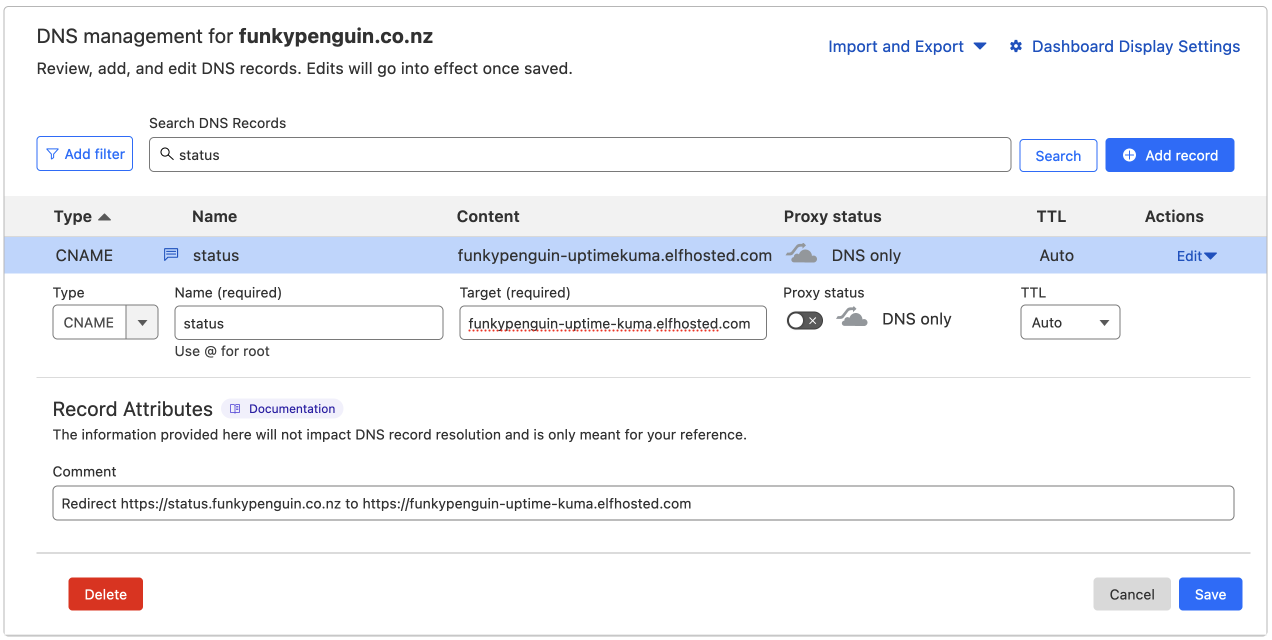
Yes! You'll need to create a CNAME DNS record pointing to <your username>-uptime-kuma.<domain>, as illustrated below, and then buy this addon from the store to make it work 
Replace <domain> with the domain in your dashboard's address (for example elfhosted.com).
How do I get UptimeKuma notifications on my phone?
Install Sam, the assistant bundled with your account, and he pushes UptimeKuma's notifications to your phone.
Add a Discord connection in UptimeKuma and use this as the webhook URL:
http://elfbot:3000/v1/push/discord/uptimekuma
That is the whole setup. No Discord account is involved, the address only works from inside your own account, and the name on the end is what UptimeKuma gets called in Sam.
Then open Sam on your phone, install him, and turn on notifications. The first alert is held so Sam can ask whether you want to hear from UptimeKuma at all, and every app gets its own switch, so you can mute one without losing the rest.
See Sam for the other formats, and for what happens when you tap an alert.
UptimeKuma also works with
How do I get support for UptimeKuma?
-
For general use of UptimeKuma, refer to the official site or to one of the links in the resources section below.
-
For specific support re your ElfHosted configuration / account, see the ElfHosted support options!
Sponsor UptimeKuma ❤️
You can contribute directly to the development of UptimeKuma using the following:
UptimeKuma resources
What users say..
We're rocking some excellent  TrustPilot Reviews, and here's what some of our
usersfriends say..
It all seems to be working now great service
Literally what the slogan says. Self hosting without the suffering, setup once and just forget about, let them deal with being the system admin for a cheap monthly sub!
A great service. The after care is first class. Highly recommended
Amazing experience. So easy to use and setup. Highly recommend