Terraria
Updated
Terraria server hosting built for families. Your kids get a world that is still there tomorrow. You get a private panel that shows who is playing and for how long, closes the world at bedtime, and messages you when someone joins.
Most Terraria hosting solves the first half. This solves both.
Underneath it is a dedicated server running TShock, always on, at a fixed address your kids' friends can save once. The world lives on backed-up storage rather than somebody's desktop, and TShock adds the server-side tooling vanilla lacks: player accounts and permissions, regions you can protect from griefing, and bans.
Built by parents who run one at home, which is why bedtime exists at all.
Get a 7-day trial of ElfHosted Terraria! 
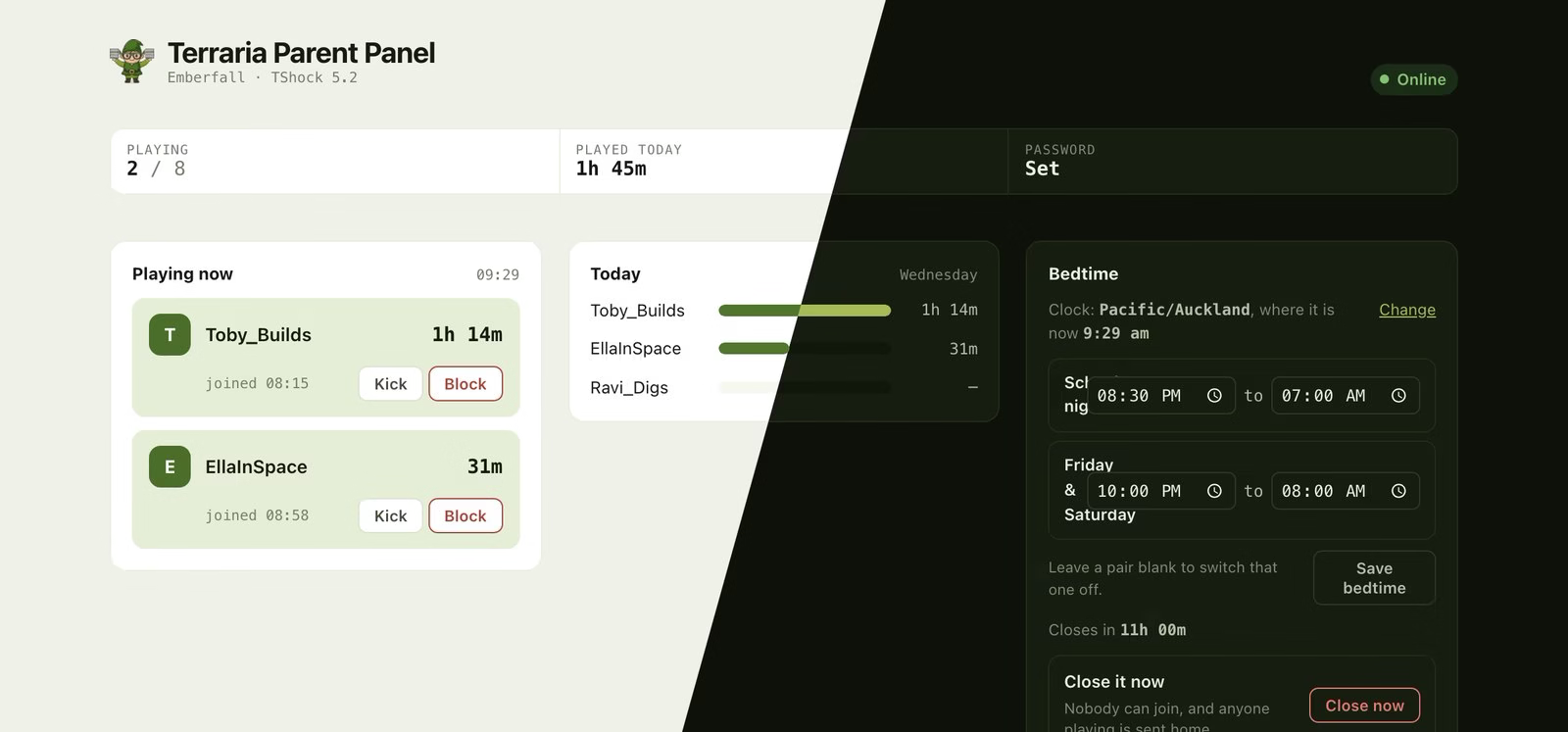
Who is playing, how long each of them has played today, and a bedtime counting down. Shown in both light and dark. The players are made up; the panel is not.
Can I see who is playing on my Terraria server?
Yes. Every server here comes with a private web panel at https://your-username-terraria.elfhosted.com showing who is on right now and how long each of them has been playing this session.
It signs in with your ElfHosted account, so it is yours alone. Nobody who plays on the server can open it, and they do not need to.
Can I limit how long my kids play Terraria?
Yes, in two ways.
The panel records how long each player has been on, today and across the past week, so you can see at a glance whether "I only played for a bit" is true. And bedtime closes the world on a schedule, so the limit enforces itself.
How do I set a bedtime on a Terraria server?
Open your panel, choose Bedtime, and set the hours the world is closed. You can set different hours for school nights and for Friday and Saturday.
While it is closed nobody can join, and anyone still playing is sent home. They get a warning in the game ten minutes and one minute beforehand, so nobody loses a boss fight to it.
If you want to make an exception, open it from the panel and it stays open until the end of that night. Tomorrow's bedtime still happens, so one late night does not quietly switch the whole thing off.
There is also a Close it now button, for the times when asking twice has not worked.
Set your timezone first
Bedtime runs on your server's clock, which starts on UTC, so the panel asks you to pick your timezone before you can set a bedtime at all. It is the first thing in the Bedtime card, your browser fills in the answer, and the panel shows the current time in whichever zone you chose so you can check it at a glance.
Will I know when someone joins?
Yes, and it needs no setup. If you have added ElfHosted to your phone's home screen and allowed notifications, join and leave alerts arrive there automatically.
Several kids arriving at once become one message rather than four, and a reconnect after a dropped wifi link is not reported as leaving. Repeats replace each other on your lock screen instead of stacking up.
You can mute game alerts on their own from ElfBot, without losing the ones that matter more, like a failed backup.
Can I send them somewhere other than my phone?
Yes. Set PARENT_NOTIFY_URLS with ElfBot to one or more Apprise URLs and alerts also go to a family Discord, Telegram, ntfy, Pushover, or an email address. That is the way to get them to the other parent, or to a phone that never installed anything.
Both run at once, so you can have alerts on your phone and in a household chat.
Can I see what my kids build, or read their chat?
No, and that is deliberate. The panel shows you who is on and for how long, and lets you close the server. It is a way to run the household rule you already have, not a way to watch over their shoulder.
We do not read chat, moderate players, or vet who joins. You decide who gets the password.
How do I invite my kids' friends?
Open Invite someone in the panel. It gives you a ready-made message with the address, the port and the password already filled in, plus the two clicks the other child needs in Terraria. Copy it, or send it straight from your mail app.
Only send it to people you are happy to have on the server. If it gets passed around, change the password in the panel and send the new one.
How do I connect?
The panel is for you. Players connect from the game itself, not a browser, and at a different address.
In Terraria: Multiplayer → Join via IP, then enter your server's address, your-username-terraria.direct.elfhosted.com, and its port when prompted.
The field says 'IP address', but a hostname works fine
Terraria's UI asks for an IP. Type the address above anyway; it resolves correctly on desktop and mobile. There is no fixed IP to give you: the address follows your server automatically if it moves between machines, which is exactly what you want.
Where do I find my port?
Your port is in your welcome email, and on your account page in the store. It is assigned to you and does not change, so once your friends have saved the address and port they never need to change either.
Where is my server password?
Your server is password protected, because it is reachable from the internet at an address anyone could guess. Your password is generated when your server is built and is unique to you, so there is no shared default to change in a hurry.
Find it in your panel under Server password, along with an Invite someone block you can copy straight into a message. That block has the address, the port and the password already filled in, plus the two clicks a player needs in Terraria.
Change it in the panel whenever you like. It takes effect straight away, and anyone already playing stays connected until they leave.
Change it in the panel, not in-game
The in-game /serverpassword command works, but only until the next restart, because the password is applied from your settings at startup. The panel writes both, so it is the one that sticks.
There is no way to run an open server
A Terraria server with no password, on a public address, gets found and griefed. We would rather hand you a password you can share in one click than an easy way to regret it.
Can I use my own domain name?
Prefer terraria.example.com to the address above? Point a CNAME at it from any domain you own:
terraria.example.com. CNAME yourname-terraria.direct.elfhosted.com.
(substituting your own ElfHosted username for yourname)
Then your friends connect to terraria.example.com on the same port. There's nothing to buy or configure on our side, because Terraria speaks raw TCP with no certificates involved, so a plain DNS record is all it takes.
How long before we can play?
Your world is generated the first time the server starts, and generating a large world takes several minutes. The server isn't reachable until it finishes. Later restarts load the existing world in seconds.
Worlds default to large. Set TERRARIA_WORLD_SIZE to 1 (small), 2 (medium) or 3 (large) via ElfBot before first launch. Changing it afterwards does nothing on its own, because the world already exists.
TERRARIA_WORLD_NAME names the world, and TERRARIA_SEED sets a specific seed if you want a particular world layout.
How do I become the server admin?
TShock's permissions are separate from the game. On first join, the server log prints a /setup command with a one-time numeric code. Run that in the game's chat to claim superadmin, then create yourself an account with /user add. TShock's documentation covers accounts, groups and regions in depth.
Region protection is the feature most groups end up wanting: it prevents anyone (invited friends included) from editing the bits of the world you'd rather keep intact.
Is my world backed up?
Your world is on backed-up storage, and TShock takes its own periodic world saves alongside. If something goes catastrophically wrong, the world file can be restored like any other file in your storage.
Do my kids need to install anything?
No. TShock runs on the server, so everyone joins with an ordinary, unmodified Terraria client on whatever they already play on. Nobody installs a mod, a launcher, or a client patch.
Is this modded Terraria?
No. This is the vanilla dedicated server, not tModLoader, which is a different program and not what runs here.
What happens if a player changes their character name?
They show up in the panel as a new person. Terraria lets players type in their own character name and nothing checks it, so the playtime log is an honest record of a cooperative household rather than evidence.
Bedtime is unaffected by this: it closes the whole world, whatever anyone is called.
Can they just play somewhere else at bedtime?
Of course. This closes your world, not the internet. What it does is take you out of the argument: the server is shut, and it was shut before anyone asked.
Terraria also works with
How do I get support for Terraria?
-
For general use of Terraria, refer to the official site or to one of the links in the resources section below.
-
For specific support re your ElfHosted configuration / account, see the ElfHosted support options!
Terraria resources
What users say..
We're rocking some excellent  TrustPilot Reviews, and here's what some of our
usersfriends say..
Fantastic Alternative to self hosting. The same control over everything.
Superb friendly very quick and solve the all issues I had recommend to everyone… once again ELFHOSTED is the best 👍
I've used a lot of hosted services across the years, and only a few gives you more than you pay, Elfhosted is one of this. From a premium support to an extensive catalog of services, they worth every cent payed.
Loved the simplicity, experience and support