Minecraft
Minecraft server hosting built for families. Your kids get a world that is still there tomorrow. You get a private panel that shows who is playing and for how long, closes the world at bedtime, and messages you when someone joins.
The part most hosting cannot do: the iPad, the Switch, the Xbox and the PC all play together, in the same world. Your daughter on a tablet and her friend on a laptop are on the same server, and neither of them has to care which.
Underneath it is Paper, a faster drop-in replacement for the standard Minecraft server, always on, at an address your kids' friends save once. Worlds live on backed-up storage rather than on somebody's desktop.
Built by parents who run one at home, which is why bedtime exists at all.
Get a 7-day trial of ElfHosted Minecraft! 
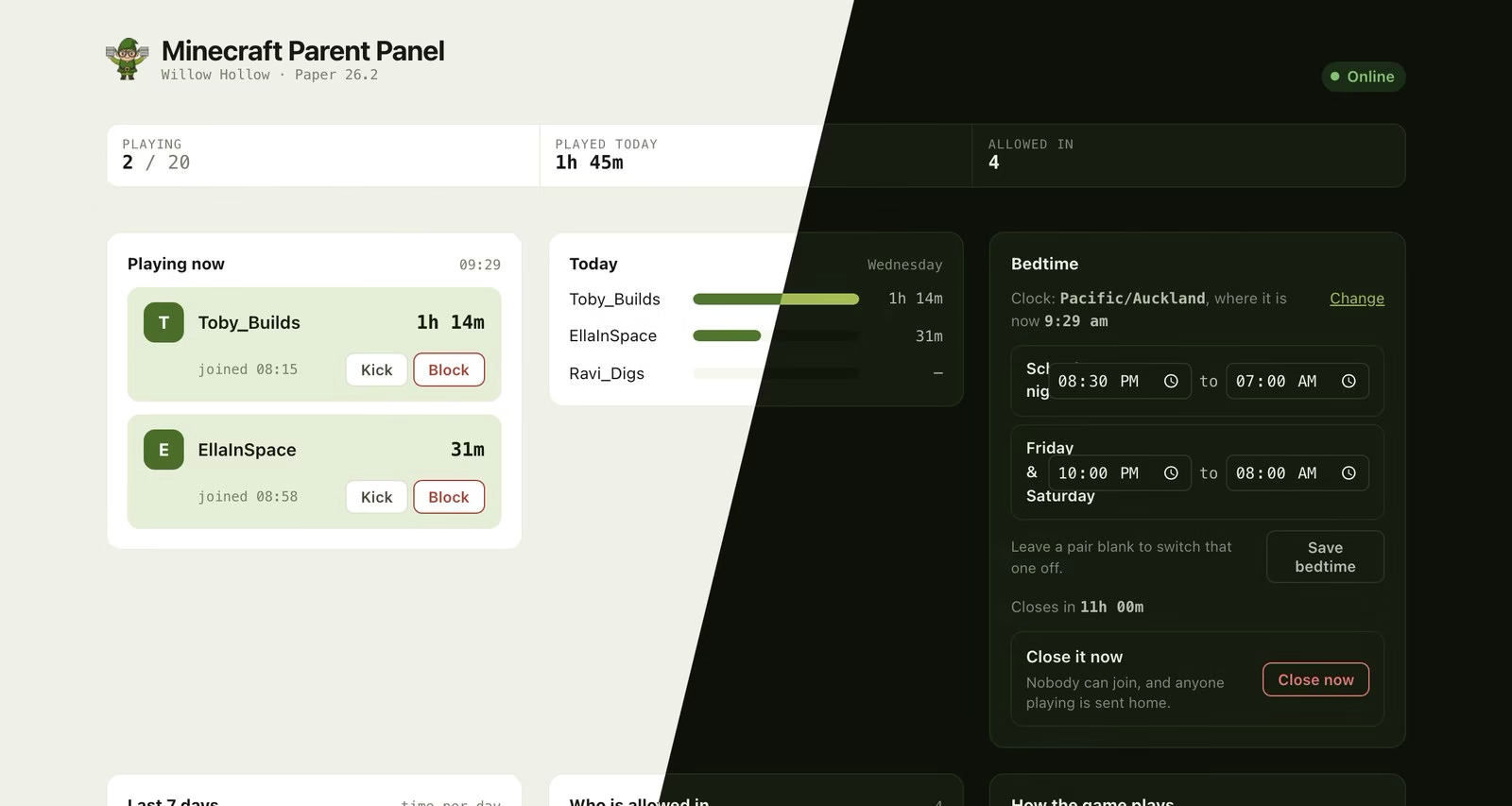
Who is playing, how long each of them has played today, who is allowed in, and a bedtime counting down. Shown in both light and dark. The players are made up; the panel is not.
How do I connect?
Two addresses, and mixing them up is the most common confusion.
The panel is a browser page at https://<user>-minecraft.<domain>, behind your ElfHosted login. It is for you, not for the players.
The game is at <user>-minecraft.direct.<domain>, and how a player enters it depends on what they play on:
| They play on | Address | Port |
| PC or Mac (Java Edition) | <user>-minecraft.direct.<domain> | none, leave it blank |
| Xbox, PlayStation, Switch, phone or tablet (Bedrock) | <user>-minecraft.direct.<domain> | your own allocated port |
Java players reach a shared router on the default port, so typing a port there is a mistake and will not connect. Bedrock players reach your pod directly and cannot connect without your port.
You do not have to remember any of this. The panel's Invite someone card writes both blocks out for you, with your real address and port already filled in, ready to copy into a message.
Can I use my own domain name?
Prefer minecraft.example.com to the address above? Point a CNAME at it from any domain you own:
minecraft.example.com. CNAME yourname-minecraft.direct.elfhosted.com.
(substituting your own ElfHosted username for yourname)
The DNS record on its own is not enough, and this is the part that surprises people, so it is worth understanding rather than just following.
When a Java player connects, Minecraft sends the address they typed inside the connection, and that is how we work out whose server they are asking for. Your custom name therefore has to be registered on our side as well, or your players arrive at the right machine and get turned away because nothing here recognises the name they used.
So there are two steps, not one:
- Create the CNAME above at your DNS provider.
- Purchase the custom domain addon, and tell us the name. We add it to your server's list of accepted addresses.
There is no certificate involved and nothing to renew, because Minecraft speaks raw TCP rather than HTTPS. It is purely a matter of teaching our router that the name is yours.
It has to be a CNAME
An A record pointing at an IP will not work, and neither will a web redirect or URL forwarding. Your server moves between machines, and the CNAME is what follows it.
Bedrock players still need the port
A custom name covers the Java half. Bedrock players reach your pod directly rather than through the router that reads the name, so they still type your allocated port alongside whichever address they use.
Can Java and Bedrock players really play together?
Yes. Two plugins make it work, and both are installed for you:
- Geyser translates between the Bedrock and Java protocols, so a Bedrock client can join a Java server.
- Floodgate lets them do it without owning a Java account as well.
The one thing worth understanding is names. A Bedrock player is a different account from a Java player, even when it is the same child, and the server knows Bedrock players by their gamertag with a dot in front. The panel handles that for you: type the name however they normally write it, and it works out which kind of account it is, adds the right one, and tells you which it added. Capital letters do not matter.
A child who plays on both a PC and a tablet genuinely has two accounts, and the panel will add both.
Who is allowed in?
Your server ships locked to the people you name. An online server on a guessable address with an open door is an invitation, so we do not ship one.
Add people in the panel under Who is allowed in. If somebody is turned away at the door, they appear in the panel with a button to let them in, so you hear about it from the panel rather than from a disappointed child.
A Bedrock player who has never connected cannot always be added by name, because the translation layer can only map a gamertag it has seen. The way through is in the panel: switch to Anyone can join while they connect once, then switch back. Close it again afterwards.
Bedtime and the parent panel
Everything the panel does is covered in the Terraria documentation, because it is the same panel: who is playing and for how long, playtime per child across the week, a bedtime with different hours for school nights and weekends, warnings in the game before it closes, push notifications when somebody joins, and a late pass that does not switch tomorrow's bedtime off.
Two things are specific to Minecraft:
- How the game plays. Game mode and difficulty are dropdowns in the panel, and the on/off settings that matter to a household are switches in plain English: whether players can hurt each other, whether they keep their things when they die, whether monsters can wreck what somebody built.
- Blocking somebody binds their Minecraft account rather than the name they typed, so they cannot come back by renaming.
Set your timezone in the panel the first time you open it. Bedtime cannot be saved until you do, on purpose: a nine o'clock bedtime against the wrong clock happens at a surprising moment.
Can I change the server settings?
Yes, with ElfBot, and this is where you need to read carefully.
Your server is set up in a specific way so that Bedrock crossplay and the parent panel both work. Changing these variables takes your server outside the combination we test, and some of them will break features you are paying for. None of this is forbidden. It is your server. But we would rather you knew which lever does what.
The safe ones
Quick-paste into Minecraft's environment variables using ElfBotMOTD=Welcome to our world
MAX_PLAYERS=20
VIEW_DISTANCE=10
SIMULATION_DISTANCE=10
SPAWN_PROTECTION=16
ENABLE_COMMAND_BLOCK=true
MOTD is the line players see in their server list. MAX_PLAYERS is what it sounds like. VIEW_DISTANCE and SIMULATION_DISTANCE are the biggest performance levers you have: raising them makes the world feel bigger and costs memory and CPU for every player online, and lowering them is the first thing to try if the server feels laggy. ENABLE_COMMAND_BLOCK is usually what a redstone-minded child is asking for.
More memory
Quick-paste into Minecraft's environment variables using ElfBotMEMORY=3G
Your server runs with 2G by default, which is comfortable for a family with vanilla Paper and a handful of plugins. Plugins and a bigger world want more.
Memory is not free, and it is not unlimited
Setting a number larger than your pod is allowed to use does not give you more memory. It makes the server ask for memory it cannot have, and the pod is stopped when it tries to take it. Raise this a step at a time, and if the server starts restarting on its own, put it back.
Adding plugins
Quick-paste into Minecraft's environment variables using ElfBotSPIGET_RESOURCES=9089,28140
SPIGET_RESOURCES takes SpigotMC resource IDs and installs them on start. This is the safe way to add plugins.
PLUGINS is managed for you
We use the PLUGINS variable to install Geyser and Floodgate, and it is one of the settings we enforce, so a value you set there is ignored rather than applied. That is deliberate: your value would replace ours rather than adding to it, which would silently remove Bedrock support. Your Java players would carry on and every console, phone and tablet player would be locked out with nothing explaining why.
SPIGET_RESOURCES is the additive one, and it is yours.
Changing the server type or version
Quick-paste into Minecraft's environment variables using ElfBotTYPE=PAPER
VERSION=LATEST
Changing TYPE turns off Bedrock crossplay
Geyser and Floodgate are installed as Spigot plugins, which load on Paper and its relatives and nowhere else. Switch TYPE to FABRIC, FORGE, NEOFORGE or VANILLA and those plugins simply do not load. Java players are unaffected. Every Bedrock player in your household stops being able to connect, and nothing on the server says why.
If your family plays across consoles and tablets, stay on Paper.
Pinning VERSION to a specific release is sensible once you depend on a plugin, so an update does not quietly stop it loading. Very new releases sometimes arrive before Geyser supports them, which is the other reason a Bedrock player can suddenly find themselves locked out.
Settings we manage, which you cannot change
A short list is fixed for every server, because changing it breaks something you are paying for, and breaks it silently:
| Setting | Why it is fixed |
ONLINE_MODE | Every player is verified against Mojang. It is what makes your allowed list mean a person rather than a name somebody typed, and what makes a block actually bind. |
PLUGINS | Carries Geyser and Floodgate, which are your Bedrock crossplay. |
ENABLE_RCON | How the parent panel talks to your server. Without it the panel loads and every control on it fails. |
ENABLE_AUTOPAUSE | Pinned off. It freezes the server when empty, which freezes the panel with it and would page you every time the children stopped playing. |
| The panel's address settings | Derived from your server and the port allocated to you. A wrong value produces an invitation that quietly does not work. |
Everything in the sections above is genuinely yours to change.
What "outside tested use" actually means
Mods and modpacks are a much bigger change than plugins. A heavy modpack can multiply memory use, lengthen world generation from seconds to minutes, and make a server that was comfortable for four children unresponsive for two.
If you change TYPE, add a modpack, or push VIEW_DISTANCE up:
- The parent panel keeps working. It talks to the server the same way regardless, so playtime, bedtime and the allowed list carry on.
- Bedrock support does not, if you moved away from Paper.
- Stability is yours to manage. We do not tune your server for a modpack, and a server that runs out of memory restarts rather than limping.
- Support gets harder. If something misbehaves, the first thing we will ask is what you changed. Putting a variable back is usually the fastest fix.
Our advice for a family server is simple: leave TYPE alone, add plugins with SPIGET_RESOURCES, and raise MEMORY one step at a time if you need it.
Do I need to accept Minecraft's EULA?
It is accepted on your behalf when your server is built, and you should know that, because it is an agreement between you and Mojang about how the server you are renting gets used.
In practice it means the ordinary things: everyone who plays needs a genuine copy of the game, and you are responsible for what happens on your server. The full text is at minecraft.net/eula.
The related document is Mojang's Commercial Usage Guidelines, which is why ONLINE_MODE is one of the settings we fix rather than leave to you: they require that server access is granted only to people with a paid copy.
If you would rather not agree to either, cancel the subscription and nothing further happens.
Frequently asked questions
Do my children need Minecraft accounts?
Yes, each player needs their own copy of the game. We host the server, not the game.
Can I bring an existing world?
Yes, upload it with FileBrowser.
Is there an extra charge for the parental controls?
No. The panel comes with the server.
Can my kids reach the panel?
Only if you give them your ElfHosted login. It is at a different address from the one they play on.
Does the panel read their chat?
No, and it never will. It shows who is on, for how long, and who is allowed in. It is a way to run a household rule, not a way to watch over a shoulder.
Minecraft also works with
How do I get support for Minecraft?
-
For general use of Minecraft, refer to the official site or to one of the links in the resources section below.
-
For specific support re your ElfHosted configuration / account, see the ElfHosted support options!
You can contribute directly to the development of Minecraft using the following:
Minecraft resources
Your content, your responsibility
ElfHosted provides Minecraft as a hosted application — we do not supply content, accounts, or third-party credentials. You are responsible for ensuring that your use of this app complies with applicable laws and our Acceptable Use Policy. If you have questions about what is or isn't permitted, please reach out — we're happy to help.
What users say..
We're rocking some excellent  TrustPilot Reviews, and here's what some of our
 usersfriends say..
I am new here, but today I learned realized that Elfhosted is one of the best free and open source software communities I've seen, and FOSS communities have been at the center of my life since the 90s (Perl, PHP, Symfony, Drupal, Ethereum, etc.). Great open software built by great people who care = great community, and that is something special.
You've done an amazing job @Funky Penguelf with the platform you provide and this place has an awesome mix of active community caretakers and software creators that I've seen here so far like BSM, Spoked, LayeZee and other elf vengers. Keep up the energy, productivity and community and take time to enjoy it and appreciate each other!
@skwah (Discord)
As a happy Elfhosted customer—who also self hosts MANY things across about 10 severs (dedicated, VPSes, and VMs running on Synology), I wouldn’t switch to self hosting the services I get from Elfhosted. They just work with very little effort configuring things, and the support the owner and his team provides is second to none. Plus I love being part of a fledgling—but quickly growing—enterprise.
/u/jatguy. (Reddit)
I’ve been using this service for a while now, and honestly, it’s a game-changer compared to anything else I’ve tried for managing my media library. The support is fantastic—super quick, and if the staff aren’t around (which rarely happens), the community steps up right away. I can’t imagine going back to any other platform.
Before this, I had my own setup with a NUC, NAS, and tools like Sonarr and Radarr. It worked pretty well for a while, and my internet speed was high enough to stream without any buffering. But in the end, it wasn’t worth the time or headache of managing all the storage and keeping everything running smoothly.
Now, with this service, everything runs smoothly in 1080p+ with no buffering issues. The interface is really easy to use, which makes managing everything a breeze. Plus, having a whole community of smart people available for guidance is a huge bonus.
I was sold from the start, which is why I quickly upgraded from a 1-month to a 3-month subscription, and I’m planning to switch to a 1-year plan soon. This service totally pays for itself, and I’m sure you won’t be disappointed. It’s been really impressive.
@seapound (Discord)
Best possible options for anyone looking for the do-it-all option along with the best customer service ive experienced in this space so far. Id rate it a 6 if I could but its limited to 5/5...
@hashmelters (Discord)
(responding to a discussion re the cost of ElfHosted vs mainstream streaming / self-hosting):
I didn't know that the goal of this project was to compete with large companies running/renting entire DCs. I was under the impression that the goal of this project was to manage the updating of almost selfhosted applications on a shared platform with other users. Basically, be my sysadmin for me.
That being said, paying for services is the 'easy button'. There is a real world cost incurred for the time saved. Time is money. Time is the most valuable currency that exists. Once time is spent, it's forever lost, one cannot retrieve it again (yet). In my mind, there are 3 options for use of time with respect to: mainstream, selfhosting, elfhosted.
-
mainstream - my time is valuable and I don't want curated content and I don't care what content that I have the ability to consume. I only like what's popular.
-
elfhosted - my time is valuable, I want my own curated content without being forced to browse past the same damn entry 500 times just to find out that I can't watch the movie I want because it's not available in my current location or was removed last week from mainstream providers.
-
selfhost - I care about costs and I have nothing but time to waste or I want to learn about the backend of the systems involved. I'll pay for my own VPS/homelab, electricity, manage the OS, manage app updates, figure out how to make the apps talk nice to each other, create my own beautiful frontend.
I know how much my time is worth, does that reddit poster know how much their time is worth? Without knowing what you are worth, you can't make effective capital expenditures with respect to the time it will take to recoup the capital.
I know I don't need elfhosted at all for my use case. I choose to stay with elfhosted because it's my 'easy button'. It's an efficient capital expense for the amount of time it saves me managing my own hardware, apps and saves me electricity costs. I'm also in a situation where I don't have upload bandwidth from my home to serve HD content to myself remotely. If I lived back in a city, I would still be here. My time is worth $$/hr.
@cobra2 (Discord)
"Just wanted to check in here and let @Darth-Penguini and anyone/everyone else know...WOW. I have been struggling with storage for years, maintenance of Docker containers, upkeep, all of it. Elfhosted is so freeing. It's an amazing service that I hope to be a member of for a long, long time!"
@Fingers91 (Discord)
"I would recommend ElfHosted to anyone. It has been great so far and made life a lot easier than running my own setups. If you’re in the fence give them a try and help support this great community."
Zestyclose_Teacher20 (Reddit)
"thanks for the help and must say this is the best host I every had for my server 🙂 10/10 🙂 All other places I have try have I got a lot buff etc. Your host can even give me full power on a 4K Remux on 200GB big movie file . That's damn awesome 😄"
@tjelite (Discord)
"What an amazing support system these guys have Chris and Layzee i think it was! Both are very patient with me even though I am a newbie at all this. Very thorough and explained everything step by step with me
I couldn’t ask for anything better than the service I have received by these guys! Happy happy client❤️"
@dead.potahto (Discord)
"Very happy customer. Great service"
@ronney67 (Discord)
"Very good customer service, frequent updates, and excelent uptime!!!!!"
@ed.guim (Discord)
"I had my own plex-arrs setup on hetzner for years. Yesterday I deleted everything as elfhosted has gone above and beyond it. And it has a fantastic, active community as well! Very friendly, helpful and like-minded folks always willing to help and improve the system. Top notch!"
@alon.hearter (Discord)
"Absolutely Amazed with the patience and professionalism of all Elf-Venger Staff including bossman penguin❤️"
@dead.potahto (Discord)
"@BSM went above and beyond to make sure I had all the one on one support needed with my sub. Thank you for your patience! Elfhosted continues to be Elftastic !!"
@bfmc1 (Discord)
"really enjoying the service from elfhosted. The setup is really easy from the guides on the website. And the help on the discord channel is really quick."
@jrhd13 (Discord)
"Support is amazing, and once you find a setup which works best for you it works perfectly, very happy 😊"
@fiendclub (Discord)
"great fast service, resolved my problem and really friendly"
@allan.st.minimum (Discord)
"Great service and sorted out a billing issue super quick and easy."
@scottcall707 (Discord)
"Very friendly support, resolved a problem with my account! I also appreciate the community that has been built around the service!"
@leo1305 (Discord)
"excellent customer service and very fast replies"
@yo.hohoho (Discord)
"Loved the simplicity, experience and support"
@y.adhish (Discord)
"Very friendly help as always, problem solved, one happy elf here!"
@badfurday0 (Discord)
"Great Helpful and Fast support. Thanks!"
@.mxrcy (Discord)