Jellyfin
Updated
Jellyfin is the volunteer-built media solution that puts you in control of your media. Stream to any device from your own server, with no strings attached.
Get a 7-day trial of ElfHosted Jellyfin! 
Jellyfin guides
How do I access Jellyfin?
Jellyfin is available:
- From your dashboard: https://your-username.elfhosted.com
- Directly: https://your-username-jellyfin.elfhosted.com
Signed-in users see their own URLs
The addresses above show the general pattern. Sign in and these become your personal, clickable links.
Common use cases
Jellyfin is designed for organizing and streaming your personal media collection, including:
- Personal home videos and photos: Organize and stream your family memories from any device
- Content you own: Manage media from your Blu-rays, DVDs, and digital purchases you've legally backed up
- Public domain media: Access classic films, educational content, and historical recordings
- Creative Commons content: Host CC-licensed documentaries, podcasts, and independent films
- Personal recordings: Store and stream recordings from over-the-air broadcasts (where legally permitted)
- Home media projects: Share your own creative video projects with family and friends
Users are solely responsible for ensuring all content in their Jellyfin library complies with applicable copyright laws.
How do I use it?
When you first connect, you'll be prompted to configure your admin account, setup your libraries, etc.
Metadata / Artwork
Jellyfin defaults to saving media metadata alongside the media. This will quickly exhaust your symlink storage, so ensure that the following are configured:


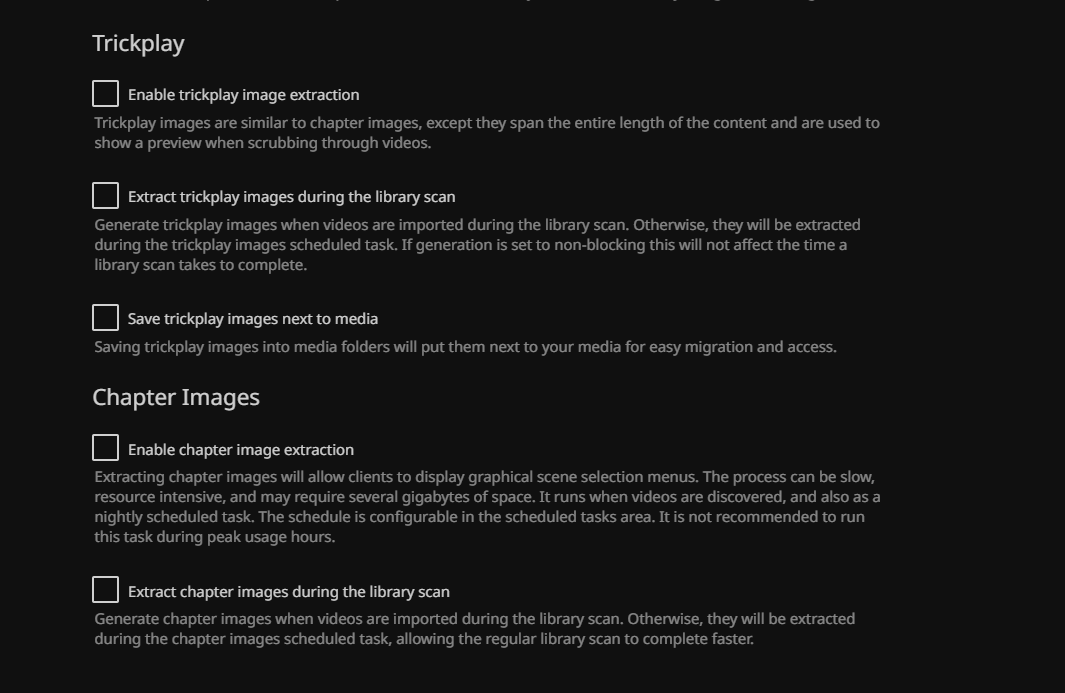
Trickplay
Disable any form of chapter analysis or trickplay, to avoid unnecessary wastage of your allocated RealDebrid bandwidth (analysis would require Jellyfin to download each entire file simply to analyze).
Enable Hardware transcoding
Our nodes support either Intel QuickSync for Video (QSV) (EU datacenter) or Nvidia (US datacenters). Enable this under the admin dashboard's Playback settings.
EU Datacenters
The following options have been tested on the QSV hardware in the EU datacenter:
- Enable VPP Tone mapping: Checked
From media players
When you configure the Jellyfin app in your media player, use https://<username>-jellyfin.<domain> as the address (if a port is required, use 443). Replace <domain> with the domain in your dashboard's address (for example elfhosted.com).
Autopulse (instant library updates)
Rather than waiting for Jellyfin to detect new media via scheduled scans, you can use Autopulse to instantly update your Jellyfin library whenever Sonarr or Radarr imports new content. See the Autopulse docs for setup instructions.
Solutions to common issues
Playback stalls
Jellyfin may be trying to transcode the media, based on a detected incompatibilty with your client/app, and running into CPU limitations. For optimal performance and quality, try to direct-play media where possible. You could also try enabling hardware transcoding (above), which will improve transcoding performance.
Which username and password do I sign in with?
ElfHosted doesn't create a Jellyfin account for you, and there's no default login to try. Your admin account is the one you made in Jellyfin's setup wizard the first time you opened it, and your ElfHosted username and password aren't used by Jellyfin at all. If you've lost the admin password, reset it as below.
How do I reset a forgotten Jellyfin password?
Use ElfBot to set the JELLYFIN_RESET_PASSWORD environment variable to your Jellyfin username, a colon, and your new password:
JELLYFIN_RESET_PASSWORD=myusername:my-new-password
Jellyfin restarts, sets that account's password, signs it out on every device, and unlocks it if too many wrong passwords had locked it. Type the username as it appears in Jellyfin (upper or lower case doesn't matter for plain letters and numbers), and the password can contain colons.
Once you've signed in with the new password, remove the variable again. Leaving it set won't sign you out on later restarts, but it will undo any password change you make in Jellyfin the next time Jellyfin restarts. This works for Jellyfin's own accounts only, not for accounts that sign in through a plugin such as LDAP.
Test your speed
To test your streaming speed to your Jellyfin instance, browse to https://<your username>-jellyfin.<domain>/speed/ to perform a speedtest.
Jellyfin also works with
How do I get support for Jellyfin?
-
For general use of Jellyfin, refer to the official site or to one of the links in the resources section below.
-
For specific support re your ElfHosted configuration / account, see the ElfHosted support options!
Sponsor Jellyfin ❤️
You can contribute directly to the development of Jellyfin using the following:
Jellyfin resources
Your content, your responsibility
ElfHosted provides Jellyfin as a hosted application — we do not supply content, accounts, or third-party credentials. You are responsible for ensuring that your use of this app complies with applicable laws and our Acceptable Use Policy. If you have questions about what is or isn't permitted, please reach out — we're happy to help.
What users say..
We're rocking some excellent  TrustPilot Reviews, and here's what some of our
usersfriends say..
Great Service and really nice Support. I got help for all my Problems and even more. He also helped making my Setup better without asking. Great Service 5/5
Amazing service, make self hosting easy.
Easy setup, profilarr keeps everything consistent while suggestaarr has offered decent picks saving me time hunting for shows/movies. Do you really need them, no. They are that little extra that just make things better all around
Support is amazing, and once you find a setup which works best for you it works perfectly, very happy 😊